Claude Code Cost Optimization
Use Opus Less to Use Opus More.
This document explains what this project is, why it exists, and everything we built to make it work — across the MacBook Pro, the Mac Studio, and Claude Code itself. It is written in two registers throughout: a functional layer (what each piece buys you and when you reach for it) and a technical layer (how it actually works). Read the functional layer to understand the system; read the technical layer to operate or change it.
What You Need to Know First
If you already live in Claude Code, skip to The Problem. If you don't, here is the whole mental model in a page — enough to make the rest of this document land.
Claude Code is Claude with hands. It is Anthropic's coding agent: it runs in your terminal, reads and writes your files, runs commands, and holds a conversation with you while it works. Under the hood it calls Anthropic's Claude models — the same family behind the chat app, but wired to do things, not just talk about them.
You pay by the token. Everything Claude reads (input) and writes (output) is metered in tokens — roughly three-quarters of a word each. Usage plans carry rolling limits (a 5-hour window and a weekly cap); cross them and you pay overage charges. So in Claude Code, tokens are money, and they add up fast.
Why a long conversation gets expensive. A model has no memory between turns, so every time you send a message the entire conversation so far — every file it read, every command it ran, every reply — is sent again as context (the "prefix"). A session running for hours can re-send hundreds of thousands of tokens on every single turn.
Prompt caching is the discount that makes that bearable. Anthropic caches the repeated prefix so you are not billed full price to re-send it — as long as you hit the cache again before it expires. That expiry window is the cache "TTL" (time-to-live). Miss it, and the next turn pays full fresh-input price for the whole prefix again. Hold onto this one — it is the hinge the entire problem turns on.
Not all Claude is priced the same. The models form a ladder: Opus is the most capable and the most expensive; Sonnet is the strong middle; Haiku is cheap and fast. Below them sit free models you can run on your own hardware. Most work does not need the smartest model on the ladder — a fact this whole project is built on.
Two more dials worth knowing. The context window is how much the model can hold at once — 200k or 1M tokens; a bigger window remembers more but costs more per turn. And MCP servers and skills are optional add-on tools; their descriptions are sent to the model in every prompt, so each one installed quietly adds to the fixed cost of a turn whether you use it or not.
With those six ideas in hand, the problem — and everything we did about it — reads cleanly.
The Problem
Anthropic quietly reduced Claude Code's default prompt-cache TTL from 1 hour to 5 minutes. That one change quietly inverts the economics of a long session.
A cache miss re-bills the entire conversation prefix at fresh-input rates. So under a 5-minute TTL:
- An idle gap longer than 5 minutes triggers a full re-bill on your next message.
- Resuming a session after more than an hour is a near-guaranteed full re-bill.
- A 1M-token-context session multiplies the miss cost up to 5x versus a 200k session.
This was not a guess. Analysis of my JSONL session logs under ~/.claude/projects/ confirmed that 67-80% of cache-write tokens were landing in the 5-minute tier through most of the affected period. We were paying to write a cache that expired before it could be reused.
That one change (deployed silently by Anthropic, later uncovered by engineers) led to an explosion in my monthly Anthropic overage charges, which set me down the path of learning all these tools and levers to get my Claude usage as optimized as possible, while maintaining a high velocity of development. Even when April came around and Anthropic greatly increased token budgets, I decided I couldn't be that vulnerable to whimsical Anthropic pricing changes for tools that have become a core part of my business and workflows.
The goal: keep working velocity with Claude high — without running out of tokens or paying large overages on the 5-hour and weekly usage windows.
The Principle: Use Opus Less to Use Opus More
The instinct when costs spike is to downgrade — switch to a cheaper model and accept worse work. Or simply to work less (which is what I started doing in April). This project rejects that trade.
The premise instead is that Opus is the most valuable worker you have, and most of what a session spends it on does not need it. File-finding, codegen from a determinate spec, mechanical edits across many files, log-grepping, routine classification — none of that requires Opus-grade judgment. Every one of those tasks you don't spend on Opus is Opus budget preserved for what genuinely needs it: the reasoning, the architecture, the cross-domain synthesis, the judgment calls. And it is budget that is still there when you reach for it mid-thought, instead of having been burned on a cache rewrite or a mechanical edit.
So delegation here is conservation, not deprivation. The result is more effective Opus — used where it counts, available when you need it — not less.
The work falls into three strategies, each a different way to honor the principle:
- Make Claude Code itself cheaper — spend fewer tokens on every Opus turn.
- Spend Opus only where Opus is worth it — route everything else down a cost-ordered ladder of cheaper labor, with local-as-main as the extreme case where the main thread itself goes free.
- Build the infrastructure that makes "less Opus" automatic — the plumbing that lands a prompt on the cheapest capable worker without a manual choice each time.
The System at a Glance
Before the details, here is the whole cast and how it fits — so that when a later section says "launch with ccx" or "set it in ccp," you already know what those are. Everything is organized around one flow: you launch a session, your work is routed to the cheapest worker that can do it, and a couple of control surfaces let you set and see the cost posture.
The two control surfaces — what you actually touch:
ccx— the launcher. It's a command that replaces and enhances typing "claude" into your terminal. You start every session with it, and it applies the model and cost settings for that session, and then launches Claude Code. It is simply "how you open Claude Code here."ccp— the control panel, a small web GUI. Where you set whatccxapplies, per project or globally. Nothing is hard-coded;ccpis the dashboard for all of it.
The workers — who does the work:
- The local fleet — the MacBook Pro and the Mac Studio, each running free local models. Free labor.
- External providers — Codex, Gemini, DeepSeek, and Pi: more cheap or free workers beyond the local machines.
- Anthropic's models — the paid Opus / Sonnet / Haiku ladder, used where they are genuinely worth it.
The routing layer — how work finds a worker:
- The routing proxy — looks at each request and decides which model and host it goes to.
- The brokers — one front door per local machine; they queue requests and keep your work ahead of background and external traffic.
- The registry — one config file listing every host and model, read by all of the above so nothing drifts out of sync.
The two ways to hand work off — subagents (a full helper Claude with its own tools) and the delegate CLI (a one-shot model call). Both detailed in Pillar 2.
How the fleet coordinates — cross-claude, a small MCP server, lets separate Claude instances message each other (and lets me message any of them). It is how work and live tuning flow across machines and projects (more in Pillar 2).
Put together, the path of a request looks like this:
          You: a Claude Code session
                     |
          launched by  ccx   <-- configured in  ccp
                     |
              routing proxy   <-- reads the registry
              /      |       \
     local broker  external    Anthropic
     -> the fleet  providers   Opus / Sonnet / Haiku
     (MBP+Studio)  Codex/Gemini/DeepSeek/Pi
The three pillars that follow are just the detail behind this map: Pillar 1 tunes the session itself (through ccx and ccp), Pillar 2 is the discipline and the ladder for choosing a worker, and Pillar 3 is the fleet, brokers, registry, and routing that make the choice automatic.
1. Making Claude Code Itself Cheaper
Before any work is delegated, reduce what each session costs to keep alive. These levers shrink the bill on every single Opus turn.
First, I will explain these main levers and how I am adjusting them. But importantly, I chose not to hard-code any of these values into any settings files -- and instead, I have made them adjustable (both globally and on a per-project basis) through a simple web control panel GUI called ccp.
Prompt-cache TTL restored to 1 hour
What it buys you. Idle gaps and session resumes stop re-billing the whole conversation prefix. This is the single biggest direct fix for the original problem — it turns the 5-minute cliff back into a 1-hour one.
How it works. Set natively with ENABLE_PROMPT_CACHING_1H=1 in ~/.claude/settings.json. The 1-hour cache tier is available on the account, so no interception is required. Historically the project first built a dedicated TTL-rewrite proxy (ttl_proxy.py) to force the longer tier from the outbound request body; once the native flag was confirmed to work, that proxy was retired. There is no proxy in the cache path today.
Guarding the cache from a CLAUDE.md edit
What it buys you. Small to build, huge in effect. CLAUDE.md — the instructions file loaded into every session — is hashed into the prompt-cache key. The instant it changes, the entire cached prefix is invalidated and every remaining turn of the session re-bills at full fresh-input rates. A one-line edit mid-session can quietly cost you for hours. This guard makes that impossible to do by accident: before any edit to a CLAUDE.md, it stops Claude in its tracks and forces a conscious choice — so you can exit and resume in a fresh session (which rebuilds the cache cleanly and cheaply) instead of paying the penalty for the rest of the session.
How it works. A pre-edit hook fires on any write to a CLAUDE.md file and does three things at once: an audible alert, a modal dialog, and a hard halt — Claude does not proceed until you acknowledge. That pause is the entire point: it converts an invisible, expensive mistake into a deliberate fork — edit now and accept the re-bill, or exit, edit, and resume clean. The penalty it guards against is real money for the rest of a session; the hook costs nothing but a confirmation click.
Context cap: 200k vs 1M
What it buys you. When a task doesn't need the full million-token window, capping it to 200k makes the cached prefix smaller and every turn cheaper. You keep the full 1M window one flag away for genuine full-power work — you are choosing per session, not giving anything up permanently.
How it works. The cap is the CLAUDE_CODE_DISABLE_1M_CONTEXT environment variable, and the launcher ccx is its single source of truth. ccx reads a defaults.tokens setting and exports the cap per launch. It is deliberately kept out of settings.json, because a value there would override the shell export and silently make the toggle a no-op. The 1M window also requires an explicit [1m] suffix on the model string — opus or sonnet alone resolve to 200k — so ccx injects [1m] on auto/1m launches and strips it under a 200k cap. Toggle scripts: cap-context-200k.command and enable-1m-context.command.
Auto-compaction threshold (a cost/quality dial)
What it buys you. A dial that trades token cost against context retention. Compacting earlier keeps the live context smaller and lowers the cost of the next turn; compacting later preserves more reasoning history, which matters on long debugging and design chains where older context is still load-bearing. It is the one lever in this pillar that is not simply "turn it up for savings" — it is tuned to taste.
How it works. Managed in ccp and persisted to ~/.claude/settings.json as the env var CLAUDE_AUTOCOMPACT_PCT_OVERRIDE (a percentage; ccp's UI offers 50% through 95% and actively strips any legacy top-level autoCompactThreshold key). Claude Code auto-compacts once context fills past that percentage. The current posture is set conservatively toward retention — compact only when nearly full — a deliberate choice to protect work quality on long sessions over squeezing the last tokens out of this particular lever. The knob is there to pull toward earlier compaction if cost pressure rises.
Pruning context bloat
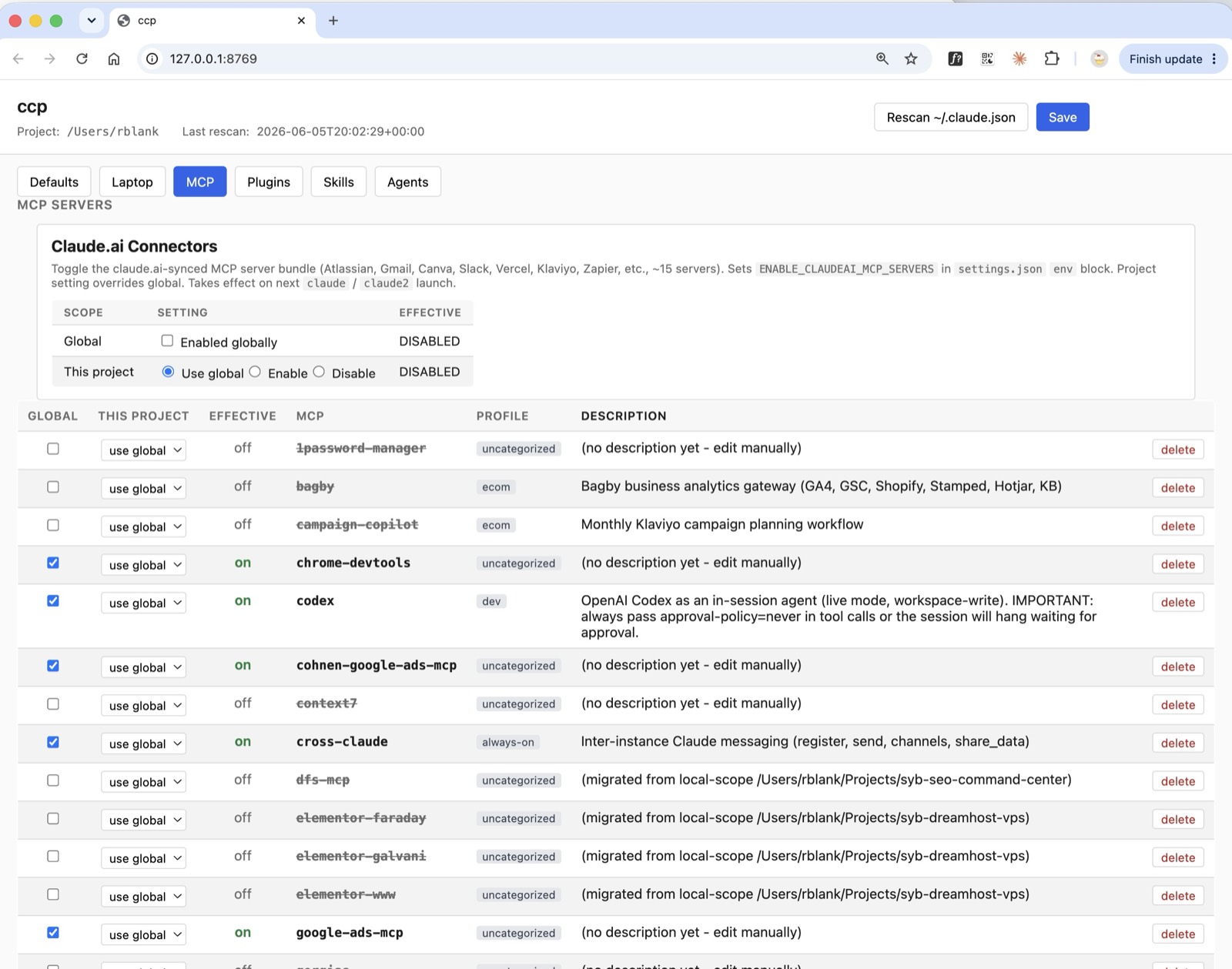
What it buys you. Every MCP server, plugin, and skill that loads adds to the always-cached prefix — you pay for it on every turn whether you use it or not. Curating them per project shrinks that fixed overhead permanently.
Unfortunately, Claude Code does not make it easy to quickly disable or uninstall different MCP servers -- especially on a project-by-project basis. This solution allows you to keep all your MCP servers installed, but only active (and consuming tokens) in the projects where you want and need them.
How it works. Handled by the ccp control app together with ccx_prune.py, which reads a per-machine allowlist (~/.claude/ccx-allowlist.json) of which MCPs, plugins, and skills to load for a given context. (ccp is covered under the control plane in Pillar 3.) This matters most for local-as-main, where the context window is small — covered in Pillar 2.
Measuring it
What it buys you. You can't manage what you can't see. Two read-only scripts tell you whether the optimizations are actually holding.
How it works. show-status.command prints the current setting plus a 7-day cache summary. audit-cache-usage.command prints a 28-day weekly breakdown plus the ten largest sessions. Both are read-only by design — they observe, they never mutate.
2. Spending Opus Only Where Opus Is Worth It
This is the heart of the principle. Opus is the most capable but most expensive worker; the discipline is to delegate by default and reserve inline Opus work for the tasks that genuinely need its judgment.
The delegation discipline
What it buys you. Delegation becomes the default, not the exception. Doing the work yourself on the main Opus thread is what now has to be justified — which flips the usual failure mode, where a capable model quietly does everything itself.
How it works. Inline Opus work is justified only by one of four roles — reason, architect, orchestrate, or verify. If none of those applies, the work delegates. Two "bright line" rules fire mechanically, with no discretion:
- Scout-before-Read — before reading a file to find something, delegate the find to a cheap scout, then read surgically by the returned cite.
- Code-from-spec — a new file, or a function from a determinate spec, always delegates, regardless of size.
Enforcement is layered so it doesn't rely on Opus policing itself: a delegation skill auto-loaded each session; a delegation-gate PreToolUse hook that hard-blocks inline new-code writes; a delegate CLI for one-shot calls; and a delegation-log CLI that keeps an append-only audit trail of each routing decision and its graded outcome.
Why scouts run on Haiku — a deliberate paid exception. Free-first has one considered exception, worth stating plainly because it looks like a contradiction. The scout role — locating a symbol, confirming a path:line cite, finding where something lives before reading it — runs on Haiku, a paid Anthropic model, not on a free local one. On purpose. Haiku is so cheap that a locate costs a rounding error, and it is dramatically faster and a more reliable tool-caller than routing the same find to a local model and waiting out a cold prefill. For high-frequency, low-stakes lookups, a fraction of a cent of Haiku buys back real wall-clock that free-but-slow would cost you. The rule is free-first, not free-only — and scouting is the clearest case where paying a trivial amount is the right call.
Subagents vs. the delegate CLI — two different handoffs
What it buys you. There are two distinct ways to push work off the main Opus thread. They look similar but are not interchangeable, and picking the right one is part of what keeps Opus usage down without slowing you down.
How it works. A subagent is a whole helper Claude. Spawned through the Agent tool, it gets its own context window, its own tools (read, write, bash, grep, and so on), and a model you choose — local or cloud. It runs a full multi-step loop: it can explore, edit files, run tests, and iterate before reporting a result back. Reach for a subagent when the work needs the harness — a multi-file change, a local test-driven loop, an open-ended research sweep. The cost is a startup tax: a subagent pays a one-time cold prefill of its tool prefix before its first turn.
The delegate CLI, by contrast, is a one-shot call to a model through the routing proxy. No harness, no tools, no multi-turn — you hand it a capability (classify, code, reason, summarize) and a prompt, and it returns text, once. Reach for delegate when the work is a single well-scoped transform: classify this item, summarize this log, emit this function from a spec. With no agent loop and no tool prefix to warm up, it is cheaper and faster than spinning up a subagent for the same small job.
The one-line distinction: a subagent is a worker with hands and its own workspace; delegate is a phone call to a model that answers once.
Why this matters most for local models. That startup tax is brutal on a local model. With a small context window and slow prefill, loading a full tool-and-skill prefix just to run a one-off find or transform can cost more in cold-start latency than the work itself — often by a lot. So local work almost always goes through delegate, not a local subagent: delegate hands the model a clean prompt with nothing to warm up. (When a local subagent genuinely is required — say, a multi-step local test-driven loop — it runs as a stripped-down local-runner agent precisely to keep that prefix tiny.)
The escalation ladder
What it buys you. When local inference can't do a job, you climb to the cheapest rung that can — never straight to the most expensive option. "Paid" is not one tier, and treating it as one is how budgets evaporate.
How it works. The cost order is strict:
local fleet (free)
  -> Codex (free but rationed; billed to a ChatGPT subscription)
    -> DeepSeek (cheap paid; roughly 1/20th of Anthropic cost)
      -> Anthropic Opus / Sonnet (expensive; true last resort)
DeepSeek must be exhausted before any paid-Anthropic call. A failure on one rung escalates to the next rung — it does not "flee to paid" on the first error.
Verify, log, escalate — and learn
What it buys you. Delegation only saves money if the delegated work is actually good — otherwise you pay twice. So nothing handed off is trusted blindly, and the checking itself is what turns the system from a static rulebook into one that gets better over time.
How it works. Opus evaluates the result of every subagent or delegate call. It records the outcome — pass, partial, or fail, with a failure mode — to the append-only delegation-log. If the result fails, Opus does not quietly redo it inline; it resubmits the task up the ladder to the next-higher tier and tries again. A job a free local model flubs escalates to Codex, then DeepSeek, then — only if it must — Opus, each step graded and logged.
Why we want a failure rate above zero. The rules here are a living toolset, not fixed law. Early on they were tuned to aim for zero delegation failures — which turned out to be the wrong target: a 0% failure rate just means you're being too timid and sending too much to Opus. The real goal is a failure rate above zero, because that is how the true boundary of each model gets found. The delegation-log is the dataset that makes that learning possible — it captures where the lines actually are, so the rules can be sharpened toward them. (This layer is days old and still moving; the log exists precisely so it can.)
Tuned live, across instances. Separate Claude sessions can talk to each other over cross-claude, a small MCP server (https://github.com/rblank9/cross-claude-mcp). That makes a rule adjustable mid-flight: when one project's Claude was under-delegating, a quick cross-claude conversation diagnosed why, and the delegation skill was updated on the spot — no restart, with every live session picking up the change. The fleet tunes itself, with me in the loop.
The labor pool
What it buys you. The more capable cheap and free workers exist, the less often Opus is needed at all. Breadth of the pool is the savings.
How it works. The pool is:
- The local fleet — laptop and studio running local models via llama-server, free.
- External providers wired in as additional rungs: Codex (background, live, and subagent modes), Gemini (background and subagent modes), DeepSeek (the cheap paid rung), and Pi (a local coding agent available live in-session for second opinions and parallel work). A deliberate choice here: Codex and Gemini are reached over MCP, not their metered APIs — so the work draws on the quota already bundled with the paid ChatGPT and Gemini subscriptions (or those accounts' token allotments) rather than ringing up separate per-token API charges. Same models, labor you've effectively pre-paid for.
Local-as-main: the extreme case
What it buys you. The most aggressive lever in the whole system: instead of only delegating subagent work to local models, the main session thread itself runs on a free local model. For work that fits a local model's judgment, the entire conversation costs nothing in Anthropic tokens.
Why this beats a standalone local agent like Pi. A separate local coding agent — Pi, for instance — also runs on free local inference, so the brain is just as cheap. The difference is everything around the brain. Going local-as-main keeps Claude Code's entire agentic harness: the tool loop, file editing, permissioning, skills, subagents, MCP integrations, the resume and compaction machinery — every convention you already work in. With a from-scratch local agent you would be rebuilding that cockpit yourself. Local-as-main swaps only the model underneath for a free one and leaves the harness intact — free inference without giving up the tooling.
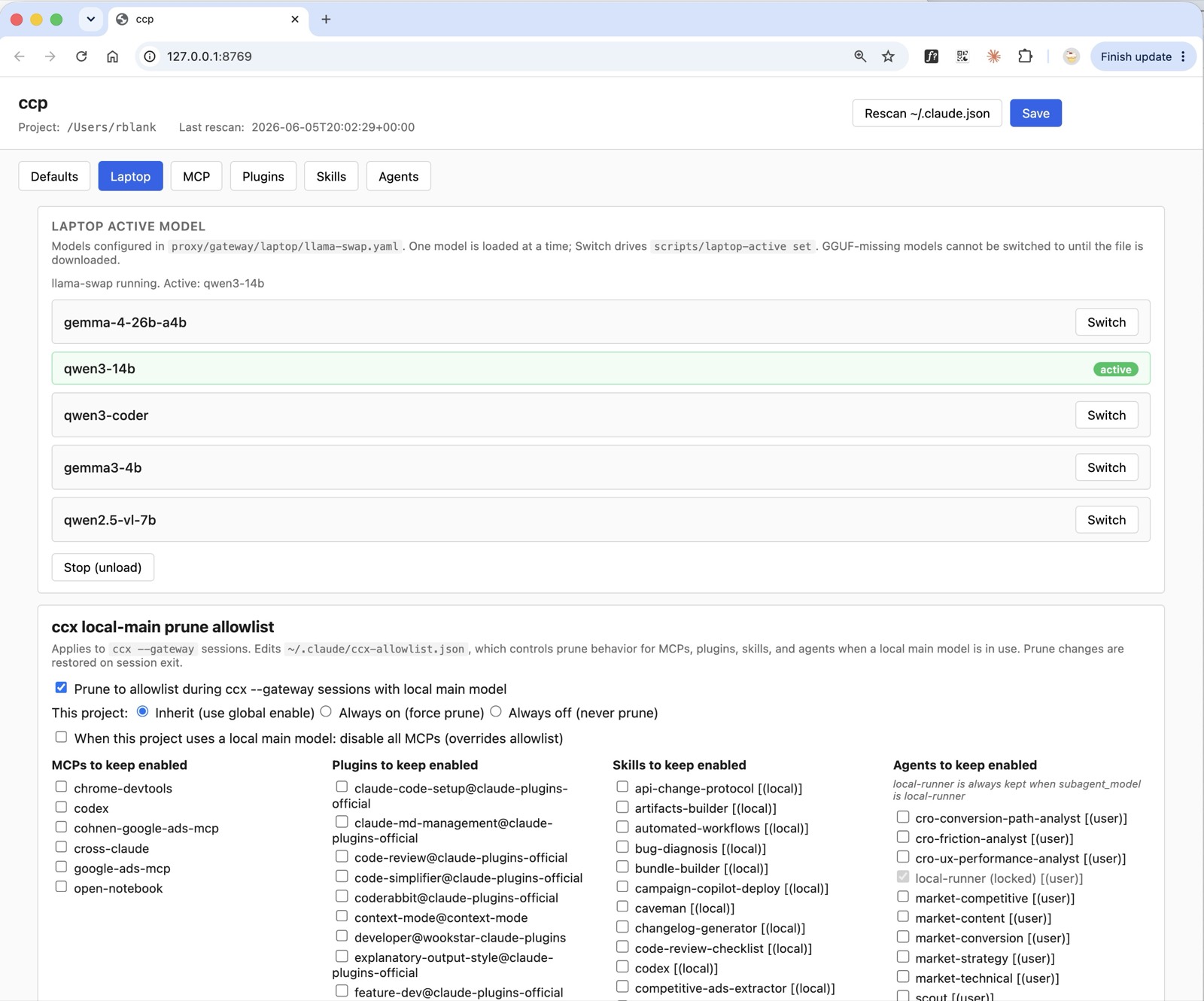
How it works. Invoked with ccx --gateway. In this mode the main model routes through the routing proxy (:8765) to a local llama-server instead of to Anthropic; the default main capability is gateway/code and the default subagent is gateway/classify. Because local models have far smaller context windows than Opus, --gateway also runs the prune: ccx_prune.py strips MCPs, plugins, skills, and agents down to the ~/.claude/ccx-allowlist.json allowlist (it force-keeps the local-runner agent only when the project's subagent model needs it). A full unpruned system prompt — tens of thousands of tokens of tool and skill definitions — would otherwise cause severe prefill latency on a local model.
The cost that remains. The honest tradeoff is cold-start latency. The first turn pays a one-time cold prefill of the whole prefix; prefix caching then makes subsequent turns fast (early measurements showed turn-1 cold-starts in the minutes on a 26B model with no caching, collapsing to a few seconds once the cache was warm — a large speedup, but the first turn is still the price of admission). Context shrinking (the prune) and prewarming the cache are the two levers that attack this. The core prune-on-launch is shipped and in use; a ccp UI panel to edit the local-as-main allowlist visually is in progress.
3. The Infrastructure That Makes "Less Opus" Automatic
None of the above survives if routing is a manual chore. This pillar is the plumbing that lets a prompt land on the cheapest capable worker without you thinking about it each time.
The two machines
What it buys you. Local inference is free, so the more work the local machines can absorb, the cheaper everything gets. Two machines means more local capacity and a fallback when one is busy.
How it works. The MacBook Pro (the laptop) runs a local llama fleet plus a multi-tenant broker. The Mac Studio runs a local llama fleet plus a multi-tenant broker and acts as the shared hub — it serves multiple tenants including my primary development laptop, a mini PC that I use as an automation manager on my local network, and external users (via Tailscale). The Studio is a 36GB machine with roughly a 30B-parameter Q4 ceiling; its edge over the laptop is availability — it is always on and always reachable. The two hosts run the same runtime; their asymmetry is a sizing-and-policy choice (studio does heavy work, laptop does fast/offline work), not an architectural one.
Choosing the engine: llama.cpp vs ollama vs MLX
This was a real bake-off, not a default. We tested all three on the actual hardware before standardizing.
What it buys you. A local inference engine that holds up under concurrent load and reclaims resources cleanly when a request is cancelled — because the real usage pattern is multiple agents and background jobs hitting one model at once, not a single user typing.
How it works — the benchmark. The test was Gemma-4-26B-A4B (Q4_K_M) on an Apple M4 Max 36GB, 8192-token context, ~2k shared prefix, 256 tokens of output, swept across concurrency levels. Aggregate generation throughput:
| Concurrency | ollama | llama.cpp | Winner |
|---|---|---|---|
| C=1 | 35.9 tok/s | 28.5 tok/s | ollama |
| C=2 | 39.0 tok/s | 43.1 tok/s | llama.cpp |
| C=3 | 43.7 tok/s | 49.4 tok/s | llama.cpp |
| C=4 | 51.4 tok/s | 60.6 tok/s | llama.cpp |
ollama edges it at a single request, but llama.cpp wins at every concurrency level above 1, by about 7% on average aggregate throughput, and scales better as load rises (from 28.5 tok/s at C=1 to 60.6 tok/s at C=4 — it roughly doubles under concurrent load). With -np 4 and --cache-reuse, llama-server handles the "one model, multiple slots" design natively, which is exactly the shape of this project's load.
How it works — why MLX lost despite being faster. MLX's raw speed advantage on Apple silicon is real. In a separate single-client spike on the MacBook Pro, gemma-4-26B-A4B on MLX ran at about 53 tok/s — roughly 2.4x the ~22 tok/s that qwen3:14b managed on ollama. (At the 4B class the edge vanished: MLX's gemma-4-e4b hit ~62 tok/s against ollama's ~64 — a tie.) But note what those numbers are not: single-client measurements from a different harness, so they do not drop into the concurrency table above as a fair column — and MLX was never put through that C=1..4 sweep at all.
It wasn't, because the concurrency question was settled on architecture before throughput could matter. MLX's servers do not implement cancel-on-disconnect: when a client disconnects mid-generation, the inference slot stays locked until generation finishes, so under concurrent or long-context load — precisely this project's usage — the next request queues behind a slot that should already be free. (A concurrent stress run pointed the same way: an MLX condition under sustained competing traffic roughly halved, 16.3 -> 7.4 tok/s.) llama.cpp's llama-server, by contrast, sets a slot-level cancel flag from the HTTP layer on disconnect and reclaims the slot immediately. That — genuine cancel-on-disconnect with slot reclaim — is the real reason llama-server was chosen, ahead of any single-client speed number: raw speed is the wrong thing to optimize on a machine serving many agents at once.
How it works — the standardized topology. Laptop and Studio each run llama-server (llama.cpp's native HTTP server), orchestrated by llama-swap for model hot-swap, with models as GGUF files. Native prefix caching, concurrency, cancellation, and hot-swap come from the engine itself, which lets the routing proxy stay a thin local/Anthropic splitter rather than a fat shim.
Brokers and routing
What it buys you. One front door per machine that accepts a request and dispatches it to the right local model — with your own work prioritized over background and external tenants, so a batch job never blocks you.
How it works. routing_proxy.py listens on port 8765 (auto-started by ccx) and handles model routing and dispatch. broker_proxy.py listens on port 8768 and handles multi-tenant dispatch: a FIFO queue, an R-reserved priority lane, and per-tenant lanes (my laptop, the automation mini-PC, external users, and so on). On the Studio, the broker binds port 11500 as the sole exposed door, with the inference engine kept on localhost behind it — one controlled entry point, not a raw engine on the network.
The registry: a single source of truth
What it buys you. One config file describes every host and model, so every tool — proxy, broker, launcher, picker — agrees on what exists and where it lives. No drift, no per-tool model lists to keep in sync.
How it works. The inference registry (inference-registry.yaml, plus an optimizer mirror) is read by every component. It is version-controlled in the repo under registry/ and symlinked into ~/.claude, so a Claude Code reinstall or a wipe of ~/.claude cannot destroy it — the real file lives with the code and the link follows.
The launcher: ccx
What it buys you. ccx is how you start a session with the right model and cost settings already applied — you never hand-set a pile of environment variables to get the posture you want.
How it works. ccx is the primary launcher. It reads model and setting fields from a profile and exports them for the session: the main model, the subagent model, the delegate model, the Codex background model, the context-token cap, and a pristine-session flag. It has three modes — a default broker mode, a --gateway mode (local-as-main, with the prune), and an --opus-main mode (Opus on the main thread, no prune).
The control panel: ccp
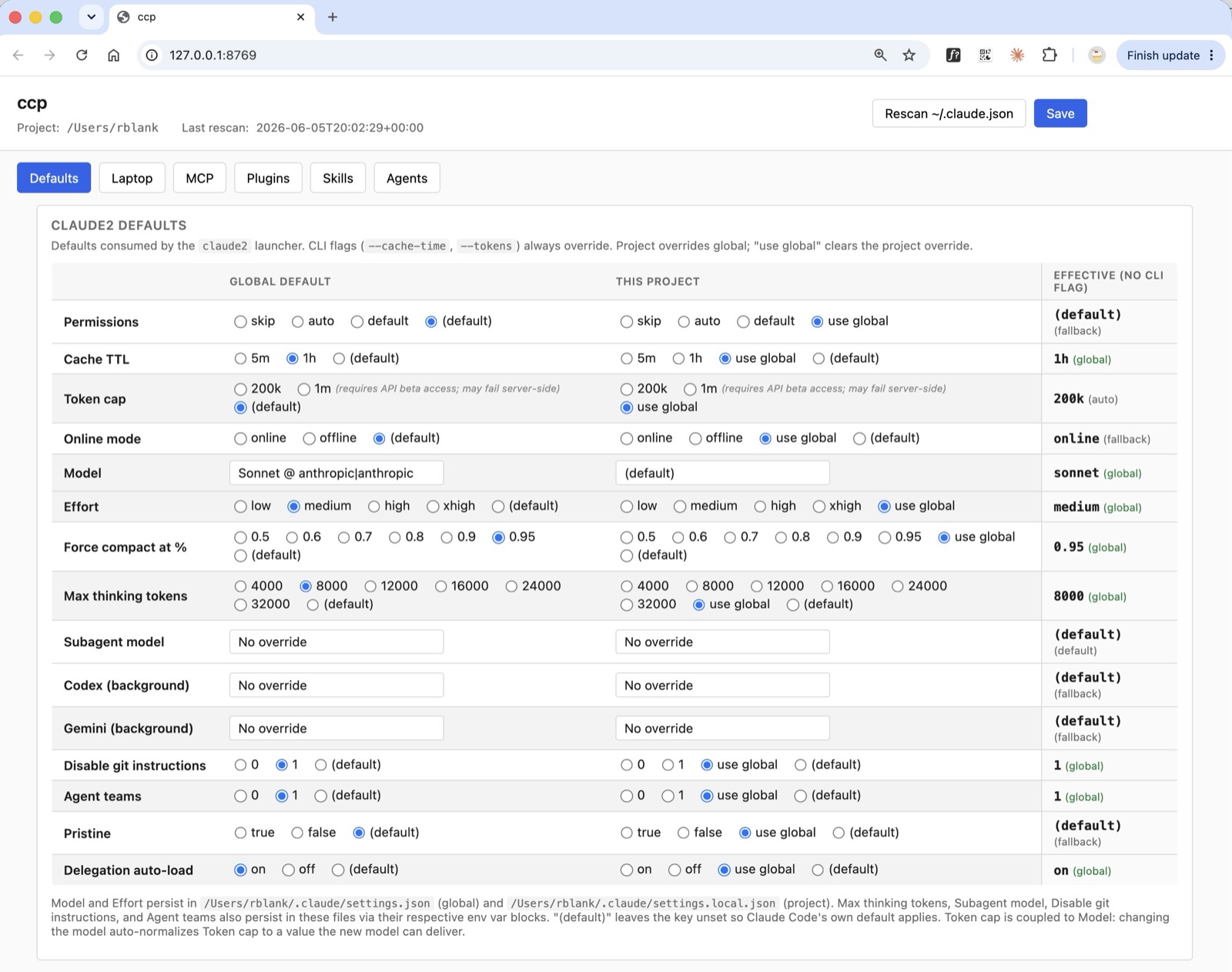
What it buys you. Almost every lever in this document — the cache tier, the context cap, the auto-compaction threshold, which MCPs and skills load, and which model fills the Main, Subagent, and Delegate roles — would otherwise be tuned by hand-editing scattered JSON files and environment variables and getting their precedence right. ccp is the single screen that controls all of it, at two scopes: a global default and a per-project override. This is the deliberate design choice noted back in Pillar 1 — none of these values are hard-coded anywhere. They all live behind this panel, so changing your cost posture for one project, or for everything at once, is a few clicks instead of a config-archaeology session. It is also what makes per-project pruning practical: you keep every MCP server installed, but only pay for the ones a given project actually switches on.
How it works. ccp ("Claude Code Picker") is a local web app at http://127.0.0.1:8769, launched with the ccp command from any project directory. It presents model rows — Main, Subagent, Delegate, and the Codex background model — alongside the settings levers and the MCP / plugin / skill curation that feeds the prune. Each control writes to the right place for its scope: per-project model and token choices land in that project's .claude-profile.json; global ones land in ~/.claude/claude2-defaults.json; and the levers that belong in ~/.claude/settings.json (the 1-hour cache tier, the auto-compaction percentage) are written there under env. The context cap is the deliberate exception — it is not written to settings.json (that would override the shell export, as covered earlier); it lives in the profile as defaults.tokens and ccx exports it per launch. The Delegate row is worth singling out: it sets the model the delegate CLI uses by default, and ccx exports that value at launch, so the picker and the command line never disagree. Together, ccx and ccp turn a session's entire cost posture into a saved default you set once and adjust visually — not something you reconfigure by hand every time.
Start Anywhere: Adopt It Piece by Piece
The most important thing to understand about all of this: none of it is all-or-nothing. Every piece stands on its own and pays off on its own. You do not need two Macs, a broker, or a routing proxy to start saving — you need whichever pieces fit your situation, in roughly this order of bang-for-effort:
- Restore the 1-hour cache tier. One line in a settings file. The single biggest direct win, it costs nothing and needs no hardware. If you do exactly one thing, do this.
- Add the CLAUDE.md-edit guard hook. Also near-zero effort and no hardware: a hook that halts before any
CLAUDE.mdedit, so a mid-session change can never silently re-bill your entire prefix for the rest of the session. Pairs with #1 as basic cache hygiene. - Add
ccx+ccpand prune your context. A little setup, then big recurring savings: cap the window when you don't need 1M, tune compaction, and stop paying for MCP servers and skills a project never uses. Still no special hardware. - Adopt tier-1 delegation. Free and behavioral — start delegating file-finds to a cheap scout and codegen-from-spec off the main thread. No new infrastructure, just discipline (and a hook or two to enforce it).
- Add low-cost API rungs. No local hardware? You can still widen the labor pool cheaply: drop DeepSeek or an OpenRouter key into the delegation roster and route the heavy-but-mechanical work there instead of to Opus.
- Stand up a local fleet. The biggest ceiling and the most setup — a spare Mac running llama.cpp, a broker, the registry. It's also the most durable win (free inference, no vendor exposure), but it's the last rung, not the entry point.
Most of the savings in this document live in steps 1-4, with no extra hardware at all. The local fleet (step 6) is where you go to push the ceiling and stop depending on anyone's pricing — which is exactly the path I took when I bought the Studio.
What It Costs You
An honest ledger, because this isn't free in effort even where it's free in dollars:
- Local models are less capable than Opus. They are strong at scoped, mechanical work and weak at deep reasoning. The whole discipline is about routing only the former to them — which means you (or Opus) still have to make that judgment call.
- Cold-start latency. The first turn against a local model — especially local-as-main — pays a one-time prefill before the cache warms. You feel it at the start of a session, not throughout it.
- This is real infrastructure. Brokers, a routing proxy, a registry, GUIs — running and maintaining the full stack is non-trivial. That is the strongest argument for the piece-by-piece approach above: take only the pieces you will actually keep maintained. The cache flag and
ccpare nearly zero-maintenance; the fleet is a small ongoing commitment. - It is young and moving. The delegation layer especially is days old and still being tuned. That's a feature — it's instrumented to improve — but also a caveat: don't expect it to be finished.
Does It Actually Work?
Measured three honest ways — not, to be clear, with a precise "percent saved" dashboard, which we do not yet have.
The hard numbers we do have:
- The cache lever is fully working. In the affected period, 67-80% of cache-write tokens were landing in the wasteful 5-minute tier. Today it reads 0.0% — essentially 100% of cache writes now land in the 1-hour tier, sustained across every week measured.
- Overages went to zero. Anthropic overage charges that hit ~$2,700 in a single month are now $0. I would rather put that money once into a Mac Studio than monthly into overages — which is precisely the trade I made.
The lived measure — throughput:
- On
ccx-level optimization alone (before delegation), I could run one or two projects concurrently without blowing through my 5-hour limits. Since deploying delegation, I work comfortably across three, up to four projects at once within the same limits. That headroom is the return.
What we can't claim yet — and won't fake:
- Delegation's token savings aren't isolated in the logs. It is only days old, its share of total activity is still small, and the cleanest signals are confounded (a scout's own reads move off the main thread into its subagent context, so the main-thread logs don't show the shift cleanly). Rather than manufacture a number, we let the
delegation-logaccumulate — it is the instrument that will show the effect honestly once there is enough signal. That restraint is the same source-discipline the rest of this project runs on.
What This Buys You
Cheaper sessions, cheaper labor, and infrastructure that routes automatically add up to one outcome: sustained velocity with Claude, without slamming into the 5-hour or weekly walls the cache-TTL change would otherwise have forced — and without surrendering Opus. That is the whole point of the principle, Use Opus Less to Use Opus More: spend Opus only on the reasoning and judgment that need it, route everything else to free or cheap labor, and Opus comes out both more affordable and more available — there when you reach for it, on the problems that actually deserve it.